Wednesday, February 11, 2015

GalaXQL - Sorting crotches among the stars.


Today I'm looking at GalaXQL, as suggested by my friend Andrew, to revisit SQL (Structured Query Language) and not just because I'm pretty interested in anything que(e)ry related but also because he promised it was fun and wouldn't put me to sleep like the last time I touched SQL.

AND SO WE BEGIN. A little "game" that tells me with SQL I can modify the bodies of the heavens themselves... an entire galaxy at my fingertips in in all its 3D particle sprite glory!
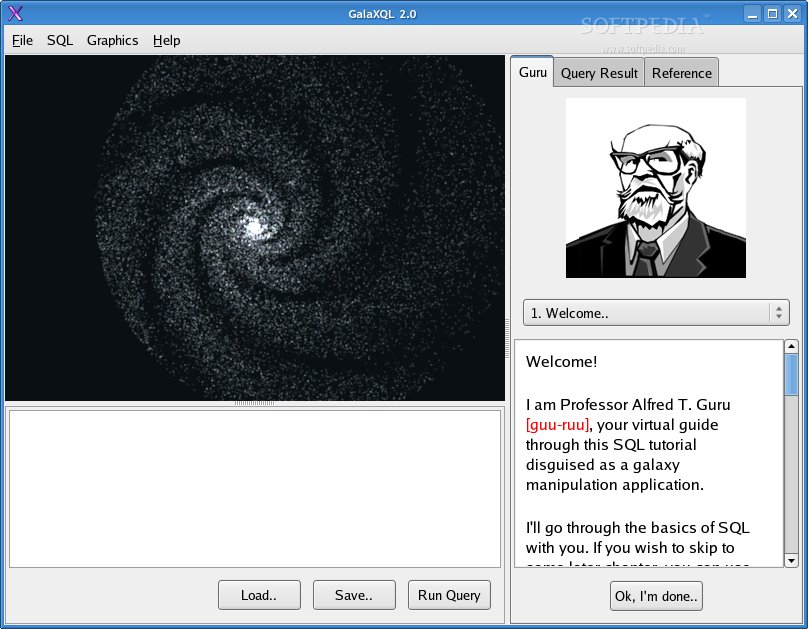
look at that fucking hipster professor, i bet he's running linux

Professor Guru starts off teaching you some very basic skills.. how to do math, for instance. Apparently you just use the SELECT command and then say whatever you want. "SELECT 3" returns 3. "SELECT 2+(5*4)" returns 22. Nothing special. Then we start querying the database itself, which is non-cryptically named "stars".

"SELECT * FROM" stars for example will select all columns from the stars database and return as a result. This particular database is pretty big and the results of the query were capped at 1000 stars, but the stars had attributes like "starid", "name", "intensity", etc. When used in conjunction with the "AS" command, you can turn take your results and turn them into something new and exciting! IT CAN BE WHATEVER YOU WANT IT TO BE. "SELECT x, y, z AS imagination FROM stars".. why the fuck not. Do what you want. Use that "imagination" row for whatever the hell you want to use it for. You are god now.
  
..if you haven't watched The Most Popular Girls In School, please unsubscribe


But moving on from making bogus columns of data, Professor Guru (the twat) wants us to learn more clauses for use in our queeryz. WHERE, AND, OR, NOT, ORDER BY, DESC and ASC are on the menu at this moment. WHERE can be used to only display data that meets certain criteria. "WHERE starid=2348" would only display data pertaining to the stars that have the value starid equal to 2348 (only one star, in this case). You could combine certain criteria with AND, OR and NOT. So "WHERE starid>2348 AND starid<2350 2349..="" 2349.5="" a="" data="" equals="" for="" have="" like="" only="" or="" p="" probably="" return="" something.="" something="" star="" starid="" unless="" we="" where="" with="" would="">

OR and NOT work as well, and anyone who has touched basic programming before knows enough about them.. but I'll explain anyway. OR means that one of the possibilities needs to be true, but not necessarily all. NOT means that the following thing must not be true for the query to return the result.

SELECT NOT suitcolor=black FROM borat

So say you get a list of all of Borat's suits which are black........NOT! How do you want to sort them? WELL, maybe by the price of the suit? You can throw "ORDER BY price" or something at the end of that query and BAM, they're in order (from lowest to highest value, typically)... but you can add "DESC" or "ASC" to the very end to be sure you have descending or ascending suit prices.

But you're a real madman when it comes to suits. You need them in a VERY particular order, and Borat buys most of his suits from SEARS when they're on sale so there's like 10 of them that all cost $50. You could add another thing to sort by afterward. So say...
"SELECT * FROM borat WHERE NOT suitcolor=black ORDER BY price DESC, crotch"
...maybe this will first sort by highest to lowest price, and then lowest to highest room in the crotch for your massive dong (which is really becoming a problem when looking for pants that fit).

so much crotch fashion

Anyway I've taken a lot of time to talk about crotches and not enough time to actually start molding my galaxy. I'll get to that some other time. Bye.

Tuesday, March 18, 2014

Update on Balloon Pop, and some other stuff! (JavaScript, HTML, Regex)

Howdy guys!

Been a while since my last teaser post about Balloon Pop and such. In short, Mr Ian sat down with me and was like "We're going to re-factor your code and make some things more efficient before we continue!" and we ended up breaking a lot of stuff which had to be fixed... which led to Ian working on most of it and then just taking it off and finishing the project overnight.

It looks great, I've got to say, but I can't follow the syntax he used. Oh well. Moving on. Maybe I'll post a link to the "finished" product just so you guys get to click around.

Went back to basics after a break (I'm lazy, I know) and watched all of The New Boston's JavaScript tutorials. Now I'm learning regex and I'll maybe look at some more HTML stuff to solidify my understanding in that realm.

Thanks for reading. Time for the gif of the week:

thanks to Nick Fish for this one guuuurrrrlll

-n00bc0d3r

Wednesday, February 12, 2014

GET EXCITED, I'M DOING THINGS. (JavaScript, HTML)

So some CRAZY THINGS have been going on and I've been pretty busy.. but now things are calming down significantly and I'm going to have a lot more time to devote to code.. (I probably sound like a broken record... I've said this so many times..)

every day i'm shufflin' -- shufflin' -- shuff -- shufflin' -- shufflin'

Anyway, the last post I made was about a balloon-popping game I was going to be working on with Ian (Mac-Daddy) the web-ninja. Well, I finally got around to it.

What Ian gave me was a little base code to work with.. basically a stage where red dots would pop up in random locations. If you clicked the dot, it animated and "popped" and added a point to the bottom of the page.

There were some buggy things we fixed together.. for example, if you clicked really fast on a "balloon" while it was "popping", it would register multiple points.. not good.

Anyway, after fixing some things I started ADDING some things! Now, there are the beginnings of a "lives" system, where instead of playing until time ran out (lame) you play until you suck too hard (swallow it).

gulp

You (will be able to) lose lives by not popping balloons fast enough. To combat you being REALLY CRAPPY and losing all your lives, once in a while a heart will pop up in the staging area. Inside the heart will be a random letter (A-Z, not cAsE-sPeCiFiC) and if you type that letter in-between popping balloons, the heart will burst and you will get another life to play with (max of 3 lives).

Here's a stunning and visually dynamic preview of the game IN ACTION (without my mouse cursor because screenshots don't dig mouse cursors):

fucking fantastic

Soon, everyone will be able to pop some balloons! I don't know if I can do a "high score" board or anything, so until then, I'll probably have you guys email me screenshots of your super high scores. Yay.

Thanks for reading! #n00bc0d3r #yolo #swag

Wednesday, January 15, 2014

Pop mah motha-fukkin balloons! (HTML, JavaScript)

Howdy folks! It's me, the n00bc0d3r, back to tell you about some n00bc0d3 I am trying to muster up the strength to work on.

My good friend Ian yelled at me and told me to make a website. So I have, kind of, the beginnings of a little website (look at how awesome it is in this screenshot):


I AM TOTALLY A L337 W3B D3$IG|\|3R!

Anyway. One of the pages (I'll have to add it to the nav bar up top) will be a little balloon-pop game! Ian has already made a huge chunk of it.. a little box that spawns divs in it at random locations, and when the user clicks on a div it has a little pop "animation" and then you get points.

The divs spawn constantly every 2 or 3 seconds about. If you leave it alone, I'm sure the entire window will just be full of little "balloon" divs.

What I'd like to make happen with this game:


  • As each balloon is popped, the time between balloon-spawns decreases slightly.
  • Balloons that are not popped within double the time that they take to spawn are DESTROYEDDDD and the player loses one life. Lose 5 lives and game over.
  • Over time, the chance for another div, a little heart, to pop up in the background that awards the player one life (max 5 lives) will increase. The trick to getting this extra life is not to click on it, but to type in the appropriate letter on your keyboard. The letter will be shown inside the heart.


That's all for now! I haven't even begun trying to tinker with what Ian has already made because I took one look at the code he wrote and was like "I HAVE NO IDEA WHAT THIS SAYS WHAT IS THE POINT OF MY LIFE"


I'm sure I'll figure it out eventually.

Sunday, January 5, 2014

Personal Home Page Hypertext Pre-Processor (PHP)

That's what PHP stands for. It's an acronym inside of an acronym.

PHP

PHP


PHPHP

Personal Home Page Hypertext Pre-Processor

I ALREADY DON'T LIKE THIS.

Saturday, January 4, 2014

Done with Dash!

Well I know I didn't post for a while because I was being a silly billy, but I've finished Dash.

I figured summarizing literally everything I do in each dash tutorial was kind of cheap and annoying so FUCK THAT NOISE. I'm done with Dash and you bitches can deal with it!


I can't say I'd recommend Dash to a friend, because I walked away from it not knowing much. Sure, I did a lot.. and it was easy to kind of understand what was going on when I was doing it, but I didn't retain much from Dash. All of it was written right there in front of me. "Oh hey, type this exact thing in. You're such a 1337 c0d3r."

But it was nice to do! And a good starting point. I think I'll pay my husband Bucky Roberts a visit and look at this HTML5 TUTORIALS because his content is always enjoyable. Also did I mention he's a cutie?


Oh yeah babi.

Anyway, much thanks to my friend Ian for introducing me to dash and getting me started with html. For now I'll go back to fiddling around with code academy I suppose! Also I need to get another set of flashcards so I can drill syntax and all. Woohoo.

Bye guyz.

Wednesday, December 25, 2013

Relative positioning and animations for my laser robot! (HTML, CSS, JavaScript)

Howdy everyone! This will be a short blog post because Ian is STARING AT ME and I feel obligated to rush.

So, last time I made a lovely robot out of divs. Well, I did that by stacking (literally) a few divs on top of each other and centering them to make a robot. That's pretty simple, but in order to have that robot move around on the page, its position needs to be relative to the edges of the page, not just centered in the middle of it.

By applying position: relative to the divs, I can move them around by using left: right: top: bottom: and giving pixel numbers to push them from those sides of the window.

While those move my robot pieces in two dimensions, I can also layer the pieces in the 3rd dimension, z-index: by using positive or negative numbers. If a blue circle has a z-index: -3 and a red circle has a z-index: 0 (which is the default, even if you don't apply a z-index) then the blue circle will be BEHIND the red circle.

Z-index does not scale the size of the elements. Also, if there is no declared z-index and two elements overlap, the one closest to the bottom will be shown first. (There's that cascade again!)


So here the wheel of my robot was moved up a little and given a negative z-index to be behind the torso. Also I made two other divs (inside the torso div) that contain J's, and rotated them and flipped one and pushed them behind the the torso. Woohoo.


As you guys can see above, I gave the right arm a special font, flipped it on it's Y axis (scaleY(-1)), rotated it, added some vendor prefixes for the whole "transform" thing, and then did other stuff to move it into place.

We also contained the pieces of the robot in one big robot div, and nested the divs for the arms in with the torso div:


BAM.

Now to animate those eyeballs.

Cotter, who is now much uglier than I remember, is yelling at me for his lasers. Those eccentric millionaires just don't know how to chill out..


So to do this, we're going to use an @ rule called keyframes. What @keyframes does is it modifies the state of something for a period of time, and then sets it back the way it was. We'll use this to modify the white glowy-eyes of our robot to become red for 50% of the time, over a duration of .5 seconds (.25 white, .25 seconds of red) that will loop for forever.

In order to do this, we need to define the keyframes rule and then assign it to the element it will be affecting.
Here is my definition of the keyframes rule, we've called it "blink":


Had to add in a bunch of vendor prefixes to be safe and make sure that it runs on all browsers.. but here's the breakdown of the syntax...
50% of the way through our timeperiod for the keyframe (which we'll define later, when we actually assign the keyframe), the background will take on the aspect of having a circle red gradient.


Above, I've assigned the animation "blink" to the brain div and given it a 0.5s time period and an infinite loop. This will modify the background of the brain div (the eyes) to be what we define in the animation (red) for 50% of the time (0.25 seconds) and to blink for FOREVER.

Cool. But Cooter--I mean Cotter still isn't happy. He wants to be able to turn the lasers on and off, not just have them shooting out for forever. I guess I get where he's coming from.. so we'll cover how to do that in the next blog post!

For now I need to go make some COOKIES. <3 bye="" christmas.="" guys="" merry="" p="">

Tuesday, December 24, 2013

Cotter loves robots. (HTML, CSS, JavaScript)

Here I am on my last segment of the Dash courses!
For this segment, my client is an eccentric millionaire named Cotter. He likes robots.


I'd be Cotter's best friend, because he looks kinda cute-ish maybe and he also has a lot of money. But alas, I am not anywhere near being a robot. Yet.

To please Cotter and provide a nice foundation for asking him if he'll be my sugar daddy, I'm going to have to learn about making shapes with HTML and CSS. Ian already had me so an exercise where I made a box that flashes back and forth between blue and red if I click it, but this may be more intense.

I'm also going to learn more about borders, and gradients, and background-size stuff. Sounds fun. LET'S GET TO IT.

So, by default a div is three things.. invisible, a rectangle based on the size of its containing element, and sexually frustrated. In the past, I inserted things into the div (color, text, pictures) to sate its burning desire to fornicate. This time, I'm going to shape divs and rub them all against each other in some softcore-porn-esque way to make them look like a robot.

...is it getting warm in here?


So since divs are born rectangles, it takes a little convincing to get them to loosen up and stop being so straight and just be a circle for a day or two. We do that with alcoho--I mean with border radius! Adding a border radius adds curves to your div. 

I just assuming that whatever value you give the border radius, it will reach out to the border and say "okay, from the center of the element, the border has a radius of this" and that makes sense to me. If you set border radius to one value, then you get something that's completely rounded. If the border radius is at least half the length of the shape, then you get a circle. 

The syntax is border-radius: top-left top-right bottom-right bottom-left; so if you only give some of the corners a radius to work with, you'll only have those parts of the rectangle rounded out. Simple enough.


Trapezoids are a bit more complicated. Because they have sharp edges, we don't use border-radius for something like a triangle. Instead, we move the border around the div.

Step 1: Make a div with some size (a size of 0 works, too)
Step 2: Add border thickness and color/transparency to create a shape that emanates from the div (which is invisible because it has no color).

Here's an example of a trapezoid I just made and some explanation below:


The div itself has no height, and a width of 140px. If it had no width, the middle square part would be gone and this would be a triangle.
The top border extends upwards 300px. Technically, the div's location in this picture is the very bottom border of the trapezoid. It has the 140px width and is invisible.
From here we create borders to the left and right of the div. Because there is no border on the BOTTOM of the div, the border on the sides stretches straight out from the center of the div, and connects to the top corners of the div. The color is transparent, so it kind of cuts triangles out of the div which would normally be a square.

Here's another illustration of the div (hooray MS paint skills):


My drawings should be in the fucking MoMA

Adding curves to the corners of this would let you shape it even more! I'm sure you guys could imagine the number of phallic divs I'm making right now.. tee-hee.

So I've done some fiddling and some rounding of edges and now I have a robot body, a wheel it rolls around on a-la the maid in The Jetsons, and a nice little head-shape. What he needs are glowy eyes. "How are the eyes going to be glowy?" you ask as you hang my illustration of my div above your mantle in your den... well I'll tell you how... RADIAL GRADIENTS.

Pop some radial gradients into the background and BAM, you got a big eye in the middle of the div. Adjust the background size of your (invisible) div, and the radial eye will start repeating, making two eyes! Or four! Or ELEVEN MILLION.

I'm not going to show you guys radial gradient things because this post is long enough.. but here is the syntax:
radial-gradient(shape, centercolor, outercolor);

In this case we made the shape circle, the center color "white 15%" and the outercolor "transparent 40%".. the percentages correlate to opacity so it makes it look more glowy.

Woohoo! After adding another little div to make an antenna, stuff is looking like a robot!


Hooray. Should put a Santa hat on him considering that it's Christmas eve... maybe later.
Anyway, the robot needs to do more stuff! It will start taking commands, moving its arms (which are yet to exist) and blinking its laser eyes. Exciting.

More to come.

Wednesday, December 18, 2013

Media Queries, the If-Then of the web! (HTML, CSS, JavaScript)

I love me some if-then statements, and media queries are what's up in CSS with that!
Here's the syntax for a media query:


Within the brackets are the condition that you're testing.
If that condition is TRUE, then the statements will execute on the elements of choice.
For example....


Above, when the page width is less than 501px, the font-size of h1 (header 1) is set to 50px.


FUCKING AMAZING. Remember to add your media query at the bottom of your style tags. Since CSS does "cascade" downward, you'll screw yourself if somewhere later in the style tag you modify what your media query is modifying. CSS pays attention to the modification that is closest to the bottom of the tag, so that's where you want your conditional formatting.

Anyway peeps I just got back from WINNING PUB TRIVIA, HELLZ YEAH, so I'm going to bed.
n00b, out!

Divs, mobile platform viewing, and sizing! (HTML, CSS, JavaScript)

So today I learn about how to make webpages look less horrible on mobile devices. Personally I hate hate hate mobile sites, because usually they change more than the way images scale and stuff.. they make an entirely new layout and it fucks everything up. But anyway, let us begin.

Apparently when making a website for that good-for-nothing whore Esha, I wasn't really understanding what I was doing when making div elements to hold photos and such of Esha's dishes. Specifically, the difference between making those photos the size of "cover" instead of "100%" or a specific pixel size.

We predefined the div height to 200px, and a div takes its width from the width of its parent element (Thanks Ian!) which, in this case, is max-width: 600px. Works out pretty perfectly for our photos... almost too perfectly...


Here's where stuff can get tricky. The body has a MAX width of 600, which is fine for the photos when the page is displayed in a bigger window. HOWEVER, on a mobile platform you probably don't have that 600px width unless you browse in landscape and the length is weird and shit. If these images were set to 100%, they would be resizing themselves to fit inside the div.

If the div goes down to 400px width, then in order for the picture to display 100%, the height of the picture must be scaled down to roughly 133px. If you remember, we made the height of the div 200px. That won't change. By default, there won't just be black-space for the other 66px of height.. it will be a repeat of the picture, like so:


For this reason, Cover is better because it just cuts the image off a bit and doesn't let it repeat. Looks slightly better.


HOORAY STORM OF SCREENSHOT'D PICTURES!

So, we'll use media queries (if, then statements) to fix this mess. But not after I watch American Horror Story with my bestie who is on her way over. EVAN PETERS IS A HOTTIE AMIRITE? I'd cover him, that's for sure.


Monday, December 16, 2013

"Gradients are a plague on humanity." - Hitler & Internet Explorer. (HTML, CSS)

Now now, guys. I haven't given up on coding just yet. Have some faith!

I've been extremely busy lately with family and friends, but now I'm a loser again and will have significantly less time away from home, so I'll be wrapping up my Dash tutorials tomorrow and continuing with codeacademy shortly thereafter.

HTML is pretty fun. Learning how CSS works is useful. I could probably be throwing some of that all in this post right now but it's almost 10 and I'm a grandpa who goes to bed early, so I won't even click the "HTML" tab here, let alone fuck with its contents.

Today I learned about how gradients aren't a default thing on the internet yet, and you need to add vendor prefixes to shit to make them work in Firefox (-moz), Chrome Opera and Safari (-webkit). IE is a loser and doesn't get any gradient goodness. Ever. Because it's a nazi and wants pure colors, all the way across. NO MIXING.


In other news, I got a new phone. THAT'S FUN. The camera is so good. HD dik pix coming ASAP, I swear guys. Those of you on my mailing list will not be disappointed.

But in all seriousness it's so much better than my old phone. I will not post about either of my phones because I know some fanboys and anti-fanboys will start yelling at me about phone things and IDNGAF.


Be good, y'all. Chat with you soon.

Wednesday, December 11, 2013

Esha can suck my div. (HTML, CSS, Javascript)


You know what, Esha? Why don't you make your own website for your shitty restaurant that ONLY HAS THREE DISHES AND ONE OF THEM IS A DESSERT. Also how about you learn how to describe your dishes? Here we go, let's do this one...


Are you fucking kidding me, Esha? Maybe your business sucks because you don't know what you're selling people and you're charging them 22 dollars for it. I don't think my super awesome HTML skills can help you, Esha. I really don't. BUT I'LL TRY ANYWAY.

In this lesson I'm learning about spans, gradients, transparency, and web fonts. Good ol' Ian tried to teach me about what a span was for a second and it basically was "it's kind of like a div but it's not"... that's all I remember, anyway. Gradients sound... fine? Transparency sounds fine as well... web fonts: comic sans all the way.

OKAY. But today I'm probably only going to do spans because I have videogaming to do. So.. SPANS. I guess I was really bad at listening to Ian because a span tag will let you change the formatting of whatever is inside the span, even if the greater tag, such as a paragraph tag, is telling it to do something else. You give each span a class name, and adjust the style from there in CSS. MAGICAL.


So then we encounter a problem... we're trying to take some prices and justify them to the right of the page, as opposed to the rest of the paragraph which is justified left. But then the span jumps up and is like "Whoa now, cowboy, I'm an inline element. I don't swing that way. I'm only block-element-curious when I'm like, really drunk".. which means that, because it's inline the element extends toward the end of the page and doesn't wrap around, so you can't be like "go all the way to the right" because it can do that for infinity. I think.

So then you have to float some more booze to our "totally inline" hot friend there and suddddenly he's so right-aligned you could throw a hotdog through the air and he'd catch it with his butt cheeks. Cuz floats will let you slide your element around inside the container element (in this case the paragraph, I believe) and you can just throw that bad-boy against the right wall and go to town.


So anyway that's what's up with spans. You can quote me.

MORE TO FOLLOW.

Monday, December 9, 2013

Ian helps me do some scandalous calculations...(javascript, HTML, CSS)

So, earlier today I was chatting with Ian on gchat (which I have up all the time during work guyz, add me) and he mentioned that he was making a javascript. He said it was a simple calculator, nothing scientific... add, subtract, multiply, divide... so I was dumbfounded.

"That sounds so easy, that sounds like your mom" I said, turning to everyone in the world to address their respective mothers. Then he sent me a link to this.


Immediately I was like WHAT. I have no experience with anything other than my silly python/javascript console. Never have I fiddled around with GUI stuff, or HTML.. or CSS... so we endeavored to play around with it and experiment via google Hangout later in the evening.

I was a HTML and CSS virgin. I asked Ian to be gentle. He rocked my world. Sometimes he was rough, sometimes he comforted me through the ordeal and through my frustration.. most of the time I felt amazing while I was workin' dat code.

So first Ian referred me to Dash to run through the introductory stuff and develop a light understanding of HTML. I had experimented before (literally for like, 5 minutes back in the MySpace days I think) and never came away really understanding what was going on.

All in all it was good. Hyper Text Mark-up Language and Cascading Something Something are TOTALLY my bitches now. Kinda. Sorta. They return my calls once in a while, is what I'm trying to say.


With that Ian helped me create the worst 'calculator' you could ever imagine, but it was something I didn't think I'd ever be able to do 12 hours ago.

It was really great having someone there with me, guiding me through and making sure I understood what was going on and testing me each time I did something wrong, or overlooked something. Brought me back to the times I'd harass good ol' Dan Miller and have him help me out.

Anyway, very excited to being a sort of pupil of Ian's. Stay tuned in if you want to read more boring shit about my n00bc0d3r adventures.


Thursday, December 5, 2013

TIL javascript and java aren't really related?

So javascript was named javascript because java was popular and for no other reason.

THAT'S weird.

Anyway I'm learning some js now because my horrible friend Ian (who I do adore) is learning it. He is, however, already a web ninja and works with code on a daily basis so I'm way behind.

So far I've covered some basics... making functions and stuff... (functions are variables wtf?).. remembering all of my semicolons;;;;;;

Time to stop posting and continue codeacademy-ing.

Thursday, August 1, 2013

Mono.py

So remember how I had this horrible flu? Haha... hahahahaha.... it's fucking mono.

Brb laying in bed for the better part of a month.

Saturday, July 27, 2013

So slow

Hey peeps. Posting from the comfort/discomfort of my deathbed (I have the worst flu in the history of forever)...

Sorry for my lack of content. Work has been shit. My new hire who I'm training is a nice woman, but she's in her 50s and is taking a while to catch on. Not much time during the day to fiddle around, and I'm naughty so I goof off after work.

Also this week I am dying of plague, so I've just been watching Dexter and updating my fb status too many times per day.

I'd insert a picture of my sick-face but nobody wants to masturbate to that.

Be cool. <3

Friday, June 28, 2013

Achievement Unlocked: You da you da best!

GUYS I DID IT. I finally finished that stupid problem. It took me like a few hours of kindof working on it at work, but with the help of PythonFiddle and a nice little notepad I've been scribbling on, everything is now so simple.

Things got SUPER EASY when I decided to make a dictionary corresponding to the days in every month when it was a leap year, and the days in every month when it was not a leap year:


yeardic = {"1True":31, "2True":29, "3True":31, "4True":30, "5True":31, "6True":30, "7True":31, "8True":31, "9True":30, "10True":31, "11True":30, "12True":31,"1False":31, "2False":28, "3False":31, "4False":30, "5False":31, "6False":30, "7False":31, "8False":31, "9False":30, "10False":31, "11False":30, "12False":31}


I know it looks kinda... gross... but it works! Before I only had 1:31, 2:29, 3:31, etc etc and I was trying to do some weird workarounds to determine when a leap year was happening and when to add +1 to my total accumulated days... silly me.

This new way is BOSS. Anyway here's a pastebin of the code if anyone wants to yell at me about how stupid it is: http://pastebin.com/wkNKPSUZ

Woo-hoo! Time to move on to the next unit.

Wednesday, June 26, 2013

Achievement Unlocked: You are a masochist.

So here's my problem, guys. I've finished a lesson in Udacity and I found out that my job does not restrict access to Udacity or Youtube, so that's pretty cool... but I'm hung up on one of the "optional questions" at the very end of the unity.

Just one.

Only one question. And I can't figure it out.

And it's probably there to just be like "haha look at this unreasonable question, you should strive to be such a baller that you can solve this one day" but I think the gaming culture of today is keeping me from continuing on without clearing EVERY. SINGLE. QUESTION as if I'll get some virtual trophy for being a cool dude.

And I'm probably overreacting, as well. The problem isn't that complex... here it is:

# Given your birthday and the current date, calculate your age in days.
# Account for leap days.
#
# Assume that the birthday and current date are correct dates (and no
# time travel).
#

def daysBetweenDates(year1, month1, day1, year2, month2, day2):
    ##
    # Your code here.
    ##

I feel like it's going to be very hard to determine what lies between two dates. I can't import any fancy stuff I can only use some loops and basic stuff.

If I figure it out throughout the day I'll post my code so you guys can be proud of me and draw me an achievement trophy and post it on f-book for everyone to see.

Sunday, June 23, 2013

Infinite loops are destroying the global economy.

Why are infinite loops destroying the global economy? Don't ask me.. ask them! But they won't respond to you. No they won't do anything but run around in little circles screaming nonsense and slowly destroying the tiny shred of humanity you left in you.

Thankfully I have enough experience through knowing my nephew that it didn't keep me from tapping away at my keyboard and slamming my head against my desk a few times today until I completed some fairy simple Python problems on Udacity. I did some simple crap with searching in strings and some math-stuff with nested loops, and was rewarded with THIS terrifying masterpiece after completing a "2 gold star" problem:


What the fuck, Udacity. I don't want your demonic lemon-head snake-eye people looking at me with the blood of my loved ones dripping off of their lips. I know they appreciate nested loops as much, if not more, than any other mythical beast, but keep that crap away from me.

Anyway, I'm slowly crawling back onto the code train. My head is already spinning a bit. I think it's because before today the only things I spent my spare-time with were True Blood (watched all 5 seasons in less than a month!), some boy I like (tee-hee), and most recently the second weekend of the third phase beta test for Final Fantasy XIV: A Realm Reborn (come play with me and my kitty-kat man!)


Half-naked man-felines aside, I hope you guys don't mind my posts which are 90% about me being silly and 10% about actually coding. I have more free time now and I'll be posting more regularly, hopefully with some higher quality content! For now, I leave you with my man-cat's butt.

Tuesday, June 11, 2013

Priorities

HELLO Y'ALL.

I know I haven't posted in a while and I have a very good reason for that.. I'm kinda trying to watch all 5 seasons of True Blood before the premier of season 6 on the 16th. Most of my free time is spent watching vampires have sexual relations with things, and now with my watching True Blood there's even MORE of that.

I'll be coding once I'm all caught up, I promise! Udacity is calling my name and twirling it's hair with one finger and such. I can only suppress my raging c0d3rb0n3r for so long.

Love you guys.